
Before you connect
- You need a RocketReach plan with API access. Essentials, Pro, Ultimate and Universal Credits plans all work. CAARD works out which kind of plan you’re on.
- Copy your API key in RocketReach under Account Settings → API Usage & Settings. Generating a new key there stops the old one working.
- Connecting, changing or disconnecting RocketReach needs the Manage integrations permission, which workspace admins have. Everyone in the workspace uses the same key.
Connect RocketReach
1
Open the RocketReach integration
In CAARD, go to Integrations and select Connect on the RocketReach card under Data Providers.
2
Paste your key
CAARD checks the key with RocketReach before saving it: that it can look people up, how many lookups your plan allows, and whether it includes company lookups. None of these checks use credits. The key is stored encrypted, and CAARD only ever shows its last four characters again.
3
Choose who enriches your leads
If RocketReach is the first data provider you connect, it starts enriching right away. If Apollo is already connected, pick RocketReach under Who enriches your leads. See Choosing a provider.
Choosing a provider
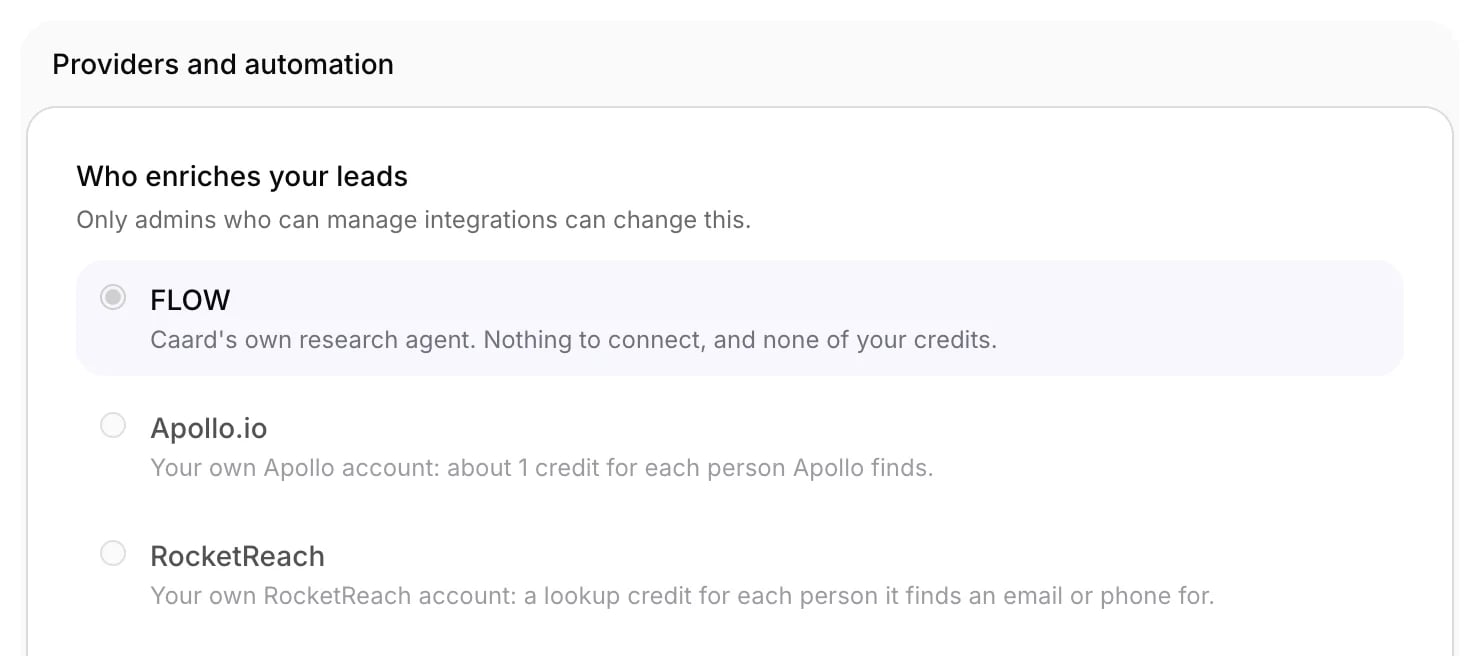
With Apollo or RocketReach picked, FLOW fills what RocketReach misses (or what Apollo misses) adds FLOW as a second pass. FLOW then looks only for the fields the provider left empty, and never overwrites what the provider found. With it off, FLOW never runs and fields the provider doesn’t have stay empty.
You can keep both Apollo and RocketReach connected. The one you don’t pick spends nothing.
What RocketReach fills
From the person lookup: job title, LinkedIn, location, email, phone, and the company’s website, LinkedIn, industry and main phone number. From a company lookup: the company’s size, NAICS code, description, founding year, address, stock symbol and revenue. CAARD only runs one when the lead still needs one of those fields, and only if your plan includes company lookups. Each company lookup uses a company credit. RocketReach has nothing for a company’s legal name, operating status, founders, funding, acquisitions, investments or exits. With FLOW fills what RocketReach misses on, FLOW looks for those. If RocketReach’s match works at a different company than the one CAARD has for the lead, CAARD doesn’t use it. Emails and phone numbers from RocketReach go through your contact checks like any other. CAARD skips F-graded, invalid and disposable addresses. An A-graded address doesn’t have to match the person’s name, but every other check still applies.Credits
RocketReach charges a lookup credit when it finds an A or A- email for the person, and nothing when it finds no one. Looking the same person up again is free. A company lookup uses a company credit. On Universal Credits a professional email is 2 credits, a phone 6, profile details 1 and a company 1, each only when found.
Phone numbers
Look up phone numbers is off by default. When it’s on, CAARD runs premium lookups (emails and phones) instead of standard ones (emails only). A premium lookup costs the same lookup credit as a standard one, and RocketReach charges it when it finds a good email or a phone. On Universal Credits each phone found adds 6 credits. CAARD only asks for phone numbers when:- the lead was identified by email or LinkedIn,
- the lead doesn’t have a phone number yet,
- and the run isn’t a CSV import.
Seeing what you’ve spent
The Usage tab on the RocketReach integration page shows the RocketReach credits CAARD spent for your workspace over the last 7, 30 or 90 days: the total by credit type, person and company lookups, each day, and, for admins, each member and the latest calls with the lead they were for. Settings → Usage shows the same total for the current cycle. RocketReach doesn’t say on each answer what it charged, so CAARD estimates it from RocketReach’s published prices and what the answer contained, and counts repeat lookups of the same person as free. RocketReach’s own billing is the record. Admins also see the account’s live balance on the Usage tab, read from RocketReach with your key.CAARD AI credits
Each enrichment also uses 20 CAARD AI credits from your workspace, whichever provider runs it. A run that fails or finds nothing gets its credits back, and the daily refresh of older leads is free. When the workspace runs out of AI credits:- Leads captured or scanned, and scheduled enrichment of new leads, wait and start once credits are back.
- The Enrich button, bulk Enrich and Ask are refused until then.
- In the CSV enrich wizard, rows that hadn’t started yet are skipped.
Rate limits
RocketReach limits how many lookups a key can make per minute, hour and day, depending on your plan. CAARD reads your plan’s limits when you connect and paces lookups to stay under them, so a large bulk enrich takes longer instead of failing. Leads waiting their turn show Waiting for RocketReach in their enrichment steps. RocketReach sometimes keeps searching after it first answers. CAARD waits up to about 40 seconds for the result. If RocketReach still isn’t done, the lead goes back in the queue and CAARD asks again a minute later, which RocketReach doesn’t charge for.Troubleshooting
RocketReach didn't accept the key
RocketReach didn't accept the key
Copy the key again from RocketReach, without spaces. If someone generated a new key since, the old one no longer works.
RocketReach won't run lookups with the key
RocketReach won't run lookups with the key
The plan has no API access, or it has run out of lookup credits. CAARD shows RocketReach’s own explanation on the RocketReach page. Fix it in RocketReach, then select Check key.
Company details stay empty
Company details stay empty
Your plan may not include company lookups. The RocketReach page says so when it doesn’t. After adding them in RocketReach, select Check key.
A field stayed empty
A field stayed empty
RocketReach may not have that field. With FLOW fills what RocketReach misses on, FLOW looks for it.