
Before you connect
- You need a paid Apollo plan. Apollo’s Free plan doesn’t include People Enrichment through the API, even with a master key.
- You need an Apollo API key with the People Enrichment and Organization Enrichment endpoints, or a master key. Create one in Apollo under Settings → Integrations → API.
- Connecting, changing or disconnecting Apollo needs the Manage integrations permission, which workspace admins have. Everyone in the workspace uses the same key.
Connect Apollo
1
Open the Apollo integration
In CAARD, go to Integrations and select Connect on the Apollo.io card under Data Providers.
2
Paste your key
CAARD checks the key with Apollo before saving it, including that it can run People Enrichment. Those checks don’t use credits. The key is stored encrypted, and CAARD only ever shows its last four characters again.
3
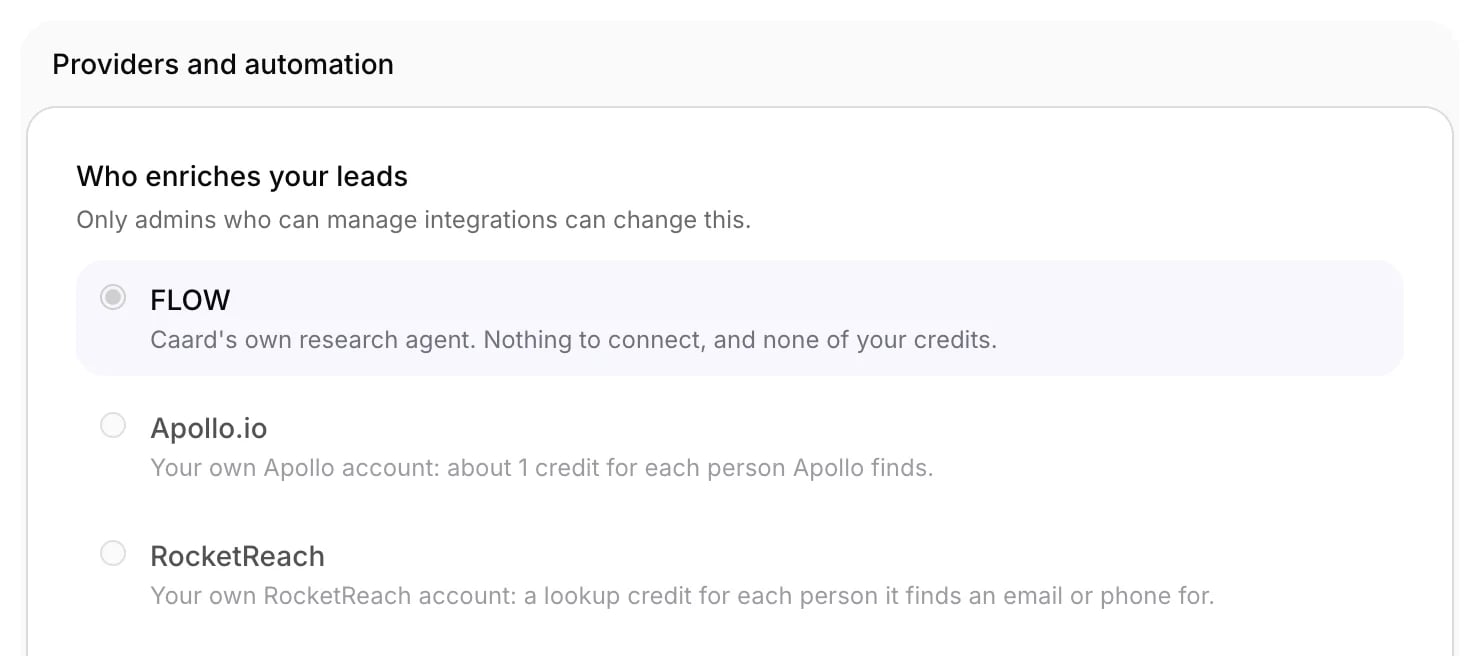
Choose who enriches your leads
If Apollo is the first data provider you connect, it starts enriching right away, on its own. If RocketReach is already connected, pick Apollo under Who enriches your leads. See Choosing a provider.
Choosing a provider
What Apollo fills
Job title, LinkedIn, location, email, phone, and the company’s website, LinkedIn, industry, size, NAICS code, description, founding year, address, stock symbol, funding, funding stage, revenue and main phone number. Apollo has nothing for a company’s legal name, operating status, founders, acquisitions, investments or exits. With FLOW fills what Apollo misses on, FLOW looks for those. CAARD only uses an Apollo match it’s confident about. If Apollo’s best match works at a different company than the one CAARD has for the lead, CAARD doesn’t use it. If CAARD knows the lead’s company domain, it then asks Apollo for the company alone. Emails and phone numbers from Apollo go through your contact checks like any other. An email Apollo has verified doesn’t have to match the person’s name, but every other check still applies. A number on a do-not-call list is shown on the lead with that reason and never used.Credits
Apollo charges about 1 credit for each lead it finds, and nothing when it finds no one. A company-only lookup is 1 credit.
Phone numbers
Reveal phone numbers is off by default. When it’s on, CAARD also asks Apollo for the person’s phone numbers. Apollo charges 8 credits for each mobile number it finds, and sends the numbers a few minutes after the rest of the enrichment. CAARD only asks for phone numbers when:- the lead was identified by email or LinkedIn,
- the lead doesn’t have a phone number yet,
- and the run isn’t a CSV import.
Seeing what you’ve spent
The Usage tab on the Apollo integration page shows the Apollo credits CAARD spent for your workspace over the last 7, 30 or 90 days: the total, each kind of call (People Enrichment, mobile numbers, Organization Enrichment), each day, and, for admins, each member and the latest calls with the lead they were for. Settings → Usage shows the same total for the current cycle. Apollo doesn’t say on each answer what it charged, so CAARD estimates it from Apollo’s published API prices and what the answer contained. Phone reveals are the exception: Apollo reports their cost, and CAARD shows that number. Apollo’s own billing is the record. Apollo also has no API for your credit balance, so the Usage tab links to Settings → Credit usage in Apollo instead.CAARD AI credits
Each enrichment also uses 20 CAARD AI credits from your workspace, whichever provider runs it. A run that fails or finds nothing gets its credits back, and the daily refresh of older leads is free. When the workspace runs out of AI credits:- Leads captured or scanned, and scheduled enrichment of new leads, wait and start once credits are back.
- The Enrich button, bulk Enrich and Ask are refused until then.
- In the CSV enrich wizard, rows that hadn’t started yet are skipped.
Rate limits
Apollo limits how fast a key can be used, depending on your plan. CAARD reads your plan’s limits from Apollo and paces lookups to stay under them, so a large bulk enrich takes longer instead of failing. Leads waiting their turn show Waiting for Apollo in their enrichment steps. If the daily limit runs out, enrichments fail with that reason, or FLOW finishes them when FLOW fills what Apollo misses is on.Troubleshooting
Apollo didn't accept the key
Apollo didn't accept the key
Copy the key again from Apollo, without spaces, and check that it isn’t revoked. The key needs the People Enrichment and Organization Enrichment endpoints, or must be a master key.
Apollo won't let the key run People Enrichment
Apollo won't let the key run People Enrichment
Apollo’s Free plan doesn’t include People Enrichment through the API, even with a master key. CAARD shows Apollo’s own explanation on the Apollo page. Upgrade to any paid Apollo plan, then select Check key.
The Apollo page says the key was rejected
The Apollo page says the key was rejected
Apollo refused the key during an enrichment, so enrichment through Apollo is paused. Select Check key once it’s fixed in Apollo, or Replace key to paste a new one.
Reveal phone numbers is greyed out
Reveal phone numbers is greyed out
Apollo delivers phone numbers to a public web address, and this CAARD deployment doesn’t have one. Contact support.
A field stayed empty
A field stayed empty
Apollo may not have that field. With FLOW fills what Apollo misses on, FLOW looks for it. Otherwise it stays empty.